Advertisement

Showing posts with label Keynoting. Show all posts

Thursday, January 20, 2022

Keynotes Editor

From the Autodesk App Store:

Description

Some of the top features of Keynote Add-in include:

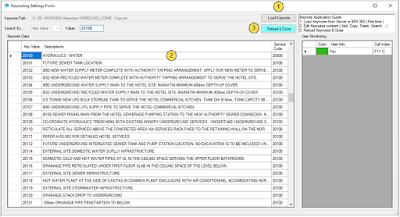
  1. Multiple users can edit Keynotes at the same time.
  2. Automatically save Keynotes Path (Just load the Autodesk® Revit® keynotes for the first time).
  3. Able to edit Keynotes from Server (LAN) or Autodesk® BIM 360®.
  4. Simple editing of Keynotes content (Add, Copy, Paste, Search.,).
  5. Automatically update the Revit keynote parameters when the key values are changed. 
  6. User monitor editor status by username and color table.
  7. Warning when the cell you are selecting is being used by another user.
  8. Automatically Reload Keynotes & Close Keynotes form in the Revit model.

Monday, August 23, 2021

VisiSpecs, The Visual Specification System

From the vendor:

VisiSpecs integrates and automates the BIM model, Keynotes, Specs and related documents. NO CHANGES are required in the BIM Model enabling immediate integration.  VisiSpecs customers testify to the ease of learning, enterprise roll-out and fast ROI based on time and cost savings and improved quality and delivery.

  • MICROSOFT WORD EDITING
    • Document neutral supporting all docs instead of tied to one master
      • Company/Client/Commercial/International masters easily imported
    • Familiar editor makes VisiWord easy to trial, learn, use, and deploy
    • Project docs and collaboration accessed directly in Microsoft Word or Revit
    • Most robust editing environment for any spec editing tool
      • Programmed routines are >40% faster than macros and other tools
      • Quickly and easily edit even if you only use 1-2 times per year
  • NO BIM MODEL CHANGES
    • Immediate integration of your current project
    • Easily link your elements + materials to required specs/docs
    • Select in Revit with dynamic highlighting of the related docs
    • SpecsIntact (UFGS) BIM Integration
  • KEYNOTING INCLUDED
    • Keynote Manager directly in Word or Revit
    • Automatic selection of keynotes based on project specs
    • Keynote Assigner with search, comments, and inline editing
    • Keynote Verifier ensuring model, specs, keynotes are coordinated
  • CLOUD BASED SOLUTIONS
    • IT loves easy deployment and fast access anywhere / anytime
    • Local backups to your server, BIM 360, or preferred path
    • Reuse design preferences with easy access to lessons learned
  • ROI SAVING TIME, MONEY AND IMPROVING PRODUCT QUALITY DELIVERED
    • Customers have ROI on 1st and 2nd projects
    • Easily verify recently completed project models and specs

Free 30-Day Trials, Customer Testimonials and Case Studies, Event listings and more can be found at www.chalklineinc.com.

Tuesday, July 20, 2021

Catching up with pyRevit — Now on Version 4.8.8

The last time we posted about pyRevit was regarding version 4.6.18 on March 11, 2019. Since then, Ehsan Iran-Nejad has continued to be very active with this extremely useful tool, and has published numerous releases since then, including two major dot releases. Here I'll try to encapsulate some of the changes Ehsan has made over the past couple of years plus...

In version 4.6.20 published on May 12, 2019, the following tools were added:

  • Create Parallel Section
  • Match Property
  • Cycle family types
  • Family type and param maker

In version 4.6.21, published on May 19, 2019, CPython was officially brought to pyRevit. The Compare Elements tool was also added.

Wednesday, December 11, 2019

Keynote Manager + v16.0

From the Revolution Design website and the Autodesk App Store:

About This Version

Version 16.0, 11/27/2019
  • New license module.
    • License with a login instead of a key (or still use the key if you are more comfortable).
    • Automatically finds all licenses for your company if you use login.
    • Connects to the management portal for license and account management.
    • Portable licenses automatically time out on crashes instead of getting stuck on the machine.
    • Standalone activation’s can be force released on the management portal.
  • Loading and other functions are now done on a background thread to improve responsiveness.
  • Settings can now be locked by managers in the settings file and will not be able to be changed by users in the UI.
  • UI now reports if a cloud based project note is hiding a master note.
  • Log level can now be set in settings allowing smaller log files and better responsiveness during normal operation.
  • New setting in update checks to show or hide pre-release versions.  If turned on, beta versions will be shown in the update list and when checking for new versions.  If unchecked only full public releases will be shown.
  • Reivt 2020 support added; Revit 2016 support removed. 

Saturday, March 2, 2019

Free and Open Source pyRevit v4.6.17

From the pyRevit blog:

pyRevit 4.6.17

By Ehsan Iran-Nejad
Mar 2, 2019

Keynote Manager Improvements

This version includes a series of improvements to the Keynote Manager and a few to other tools.

Re Issue 529 Keynote manager now sorts keynotes using an alphanumeric system. This sorting is based on the keynote key and not the keynote contents.


Read more on the pyRevit blog »

Monday, January 14, 2019

pyRevit v4.6.10, 4.6.11 & Upcoming pyRevitLabs Merge

From GitHub:

pyRevit 4.6.10

Jan 9, 2019

pyRevit 4.6.10 is out. Download the installer from here

As always, each new pyRevit version also includes the pyRevit CLI [Command Line Tool] updates which for this release is CLI v0.2.18

Numerous issues and bugs were resolved, specifically for the new Keynote Manager beta. Per Issue #465 request, the keynote manager now shows the # of times each keynote has been referenced in the project. Full list release notes are listed on the Releases page.

In addition, The import mechanism now supports both UTF-8 and UTF-16 text files.


Thursday, January 3, 2019

Free and Open Source pyRevit v4.6.9 Beta with New Keynote Manager

Ehsan Iran-Nejad, author of pyRevit, describes it this way: "pyRevit is a rapid-prototyping platform for Revit that also includes a working set of tools to showcase the platform."

With 7,054 pageviews to date, our initial post about PyRevit, from March 11, 2017, is one of our most popular. In fact, it still pops up in our Trending list. Regrettably, we haven't posted about pyRevit since its version 4.4 update on July 9, 2017. Because Ehsan posts release videos that include information targeted at developers, from a user perspective, we've had a hard time keeping up with pyRevit. According to Ehsan, "early adopters were mostly Revit developers. Most have forked pyRevit and modified it to use in their companies."

Ehsan effectively volunteers his time for the pyRevit community, so we plan to likewise do our bit with an in-depth review of pyRevit this year from a user perspective. Stay tuned!

Sunday, December 16, 2018

Macaw Plus – Search, Group and Edit Keynotes

From the Autodesk App Store:

Macaw is an Autodesk® Revit® add-in which displays the keynotes within the existing keynote table and allows for searching, grouping and editing keynotes directly within keynote application.

Here is list of Macaw Plus' features :
  • Ability to search the keynote table using keywords.
  • Create filtered keynotes and save them as grouped to make the browsing of the large tables much easier.
  • Allow the user to create keynotes directly from the keynote table.
  • Replace existing keynotes in the model with the new ones in the table.
  • Add/Remove/Edit keynotes
  • Update the existing keynotes within the model after changing the keynote index
  • Ability to undo the modification of keynote table
  • Backup the keynote file and restore the backups directly from the add-in.
  • Renumbering the keynotes using predefined indexing patterns

Saturday, November 10, 2018

Macaw – Search, Group and Edit Keynotes

From the Autodesk App Store:

Macaw is an Autodesk® Revit® add-in which displays the keynotes within the existing keynote table and allows for searching, grouping and editing keynotes directly within keynote application.

Here is the  short list of Macaw features :
  • Ability to search the keynote table using keywords.
  • Creating filtered keynotes and saving them as grouped make the browsing the large tables much easier.
  • Replacing already made keynotes in the model with the new ones in the table.
  • Ability to undo the modification of keynote table


Wednesday, April 18, 2018

Cloud Services for Keynote Manager – Keynote Sharing Across Networks and Locations

From the Revolution Design website:

CLOUD SERVICES

Why Cloud Services?

Traditional Revit uses a local text file to store keynote data which works fine… as long as everyone is on the same network. However when you need to share projects with other offices or across large geographical areas this system fails. Coordinating the keynotes quickly devolves into a mass of emails back and forth with attached text files, or a Dropbox file sharing system that is vulnerable to overwriting and still has issues with pathing.

In addition, Autodesk has introduced Revit model sharing over A360. That’s great for Revit models, but it still doesn’t allow sharing of the keynote data, so we are stuck in the same trap.

Revolution Design is proud to offer a solution to this issue with Keynote Cloud! Keynote Cloud stores your keynotes in a cloud based database, allowing access from anywhere in the world using the same path. Keynote Cloud projects can be shared with anyone inside or outside your company as long as they have a Keynote Manager Cloud account, and you set their permission levels.

Thursday, April 12, 2018

Keynote Manager v15.0 – Includes Revit 2019 Compatibility, Keynote Reporting, Usage Color-Coding, and More

From the Revolution Design website:

Version 15.0

Added

  • KM+ now allows keynote reporting. Keynote reports show all keynote usages in the project.
    • Keynote Reports can be exported to many common formats including Excel, csv, and pdf for archiving and analysis.
  • KM+ now shows different icon colors based on the usage; black for used only in parameter values (not tagged), purple for used in tags but not placed on sheets; and orange for placed on sheets.
    • Predefined searches now include ‘On Sheet’ and ‘Not On Sheet’.
  • Renumber allows numbering by increments other than 1.  For example you can set the starting value to 100 and increment to 10 in order to renumber to 100, 110, 120, 130, etc.
  • Renumber can be done recursively to the full depth of it’s branch.  Keynote Manager will use the matching portion of the key value to do an update.  For example, if you have a note number 08500 with a sub-note of 08510 and a sub-note to that of 08510.1 and you renumber the top level to 08600 with full depth checked 08510 and 08510.1 will be renumbered to 08610 and 08610.1 respectively.
  • Revit 2019 support added & Revit 2015 support removed.
  • Speed and stability updates, especially for cloud based projects.

Friday, May 19, 2017

Keynote Manager + Version 14.5

From the Autodesk App Store:

About This Version

Version 14.5, 5/19/2017

  • Added
    • Cloud console now allows sign in as monitor only.
    • Projects can now be moved to a different master in the cloud console.
    • Projects can now be renamed in the cloud console.
    • Console now allows management of joined projects including leaving projects and accepting/denying join requests..
    • A command for comparison of two arbitrary text files has been added..
    • Startup tips have been added.
    • Support for Revit 2014 has been discontinued.

Wednesday, May 10, 2017

Product Roundup: Amplify Add-ins from Dekker / Perich / Sabatini (Update #2)

From the Autodesk App Store:

Amplify for Autodesk® Revit® 

Amplify is a collection of Apps developed by Dekker/Perich/Sabatini.

www.dpsdesign.org

Create Worksets
Create worksets based on a comma-separated text file | Free

Element Case Tools
Quickly capitalize Room Names, View Titles on Sheet, and Sheet Names with this free app | Free

Wednesday, May 3, 2017

Keynote Type Preview

From the Autodesk App Store:

The Amplify Type Keynote Preview plug-in allows users to override the color of Element, Material and User Keynotes in Autodesk® Revit®. Simply choose a color based on type, and all keynotes in the active view will be overridden. To return the Keynotes back to their original state, just select the Keynote Type Preview again. This is a quick and easy way to ensure the correct keynote types are being used on your project.


Wednesday, January 4, 2017

StiKeyNotes - Simple Integrated Keynoting

From the StiKey Notes website:

REVIT KEYNOTES AS THEY SHOULD BE. 

EASILY ADD, EDIT, PLACE, AND MANAGE YOUR KEYNOTES FROM WITHIN REVIT. 

KEYNOTES SHOULD BE SIMPLE. WE MADE IT HAPPEN.

Simple
Don't let using keynotes in Revit slow down your work. Zero setup. Single click edits. No external apps or files to manage.

Integrated
Keynote editing and placement at your fingertips. Seamless integration into the Revit window & workflow.

Backwards Compatible
Convert existing projects with a single click. Share projects with non-StiKeyNotes users without further modifcations.

Revision History
See each revision for any keynote. View word-by-word modifications. Restore a previous keynote version.

Upgrade Existing models
Single-click upgrade for any existing model using the standard keynote file. Converted in seconds to StiKeyNotes.

Export Notes.txt
Export a keynotes.txt file for external collaboration or archival in a single click.


Saturday, December 31, 2016

Product Roundup – Add-ins from Revolution Design

From the Revolution Design website and the Autodesk App Store:

Revolution Design provides commercial add-ins for Revit as well as custom app development consulting.

Keynote Manager
Keynote Manager is the simple, efficient way to edit Revit's keynote files. Keynote Manager organizes keynotes in an easy to use free format and allows instant editing, drag and drop organization, commenting, file linking, and much more. Keynote Manager is the missing piece to unlock the power of Revit keynotes | Trial | 39.00-49.00 USD
 (7 reviews)

Revit workFlow
Revit workFlow is a suite of tools designed to give your Revit productivity a turbo boost. Automatically update view reference links, define an office standard and rename views to the standard with a single click, create finish floor objects and automatically coordinate them with the finish schedule, and more! Get ready to fly... | Trial | 95.00 USD (individual tool custom pricing available)
 (4 reviews)

Selection Master
Selection Master is the robust filtering and selection tool for Revit. Select elements by level, category, family, and many others with one click or build complex filter sets based on almost any property of an element. Use selection tools to identify elements on an unwanted level and the rehost tool to move them prior to deleting the level | Trial | 29.00 USD
 (2 reviews)

Keynote Manager Version 14.0 Released (Updated)

Originally published on October 15, 2016.

Updated on December 31, 2016, replacing information from the Autodesk App Store with that from the Revolution Design website, which is much more complete.

From the Revolution Design website:

Keynote Manager is the simple, efficient way to edit Revit's keynote files. Keynote Manager organizes keynotes in an easy to use free format and allows instant editing, drag and drop organization, commenting, file linking, and much more. Keynote Manager is the missing piece to unlock the power of Revit keynotes.


Simple Keynote File Editing

Revit's keynote system is a powerful way to integrate data into Revit families, reduce errors, and streamline documentation. The text files, though, are cumbersome and difficult to work with.

Keynote Manager was created to provide a simple, efficient interface to edit keynote files.

  • Edit keynotes in a tree view instead of a long list in Notepad or Excel
  • Automatically sequence keynote numbers
  • Add & edit new notes without worrying about tabs or formatting
  • Locate keynotes quickly with powerful, savable, search tabs.
  • Multiple users can work on a single file concurrently
  • Reorganize notes by simple drag and drop
  • Select multiple keynotes and renumber in sequence


Sunday, February 7, 2016

NoteMaster

From the Autodesk App Store...

NoteMaster allows the user to create and manage both project general notes and keynotes from within Autodesk® Revit®. Notemaster also maintains a master list of commonly used general notes and keynotes for use on other projects between different versions of Revit. It's super easy to use and doesn't require any setup.


About This Version
Version 1.0.0, 1/22/2016
All Functionality for both General Notes and Keynotes.

The NoteMaster add-in is brought to you by MechQuickTools and is priced at 30.00 USD. There's more information available on the Autodesk App Store.

Sunday, October 27, 2013

Keynote Manager Version 12.5 from Revolution Design Features Major Improvements

Added

  • The settings module has been revamped to make it easier for BIM managers to deploy default settings to their users..
    • All settings are stored in a simple location in xml and automatically upgrade from version to version.
    • Settings can be deployed completely, partially, or not at all by a BIM manager. Settings not deployed will revert to default values when the program is first run.
  • Floating (network) licenses are now supported.
  • Keynote Watcher has been replaced by Keynote Manager +.
    • Keynote Manager editing directly inside of Revit on a palette.
    • Palette can be positioned, flipped, collapsed, or hidden as desired and all settings are remembered from session to session.
    • Correct keynote file for the current Revit project is automatically displayed.
    • Key value changes in the file automatically update corresponding key values in Revit elements to avoid broken key links.
  • Watcher notification system has been updated and stabilized.
  • Revit 2014 is now supported.
  • Pressing Shift-Enter when editing a description now temporarily overrides automatic casing.

The Keynote Manager may be downloaded from the Revolution Design website.

Free Keynote Reporter Add-in for Autodesk Revit

From Boost Your BIM comes the free Keynote Reporter Add-in.

This app will generate a report of all keynotes in your REVIT, with information about user, material, and element keynotes and which keynotes are orphaned.

Sample output:

View Type,View Name,Keynote Element ID,Key Source,Keynote Text,Key Value,Is Orphaned
FloorPlan,Level 1,216657,User,Procurement and Contracting Requirements,Division 00,False
FloorPlan,Level 1,216717,Element,Equipment,Division 11,False
FloorPlan,Level 1,216731,Material,Procurement and Contracting Requirements,Division 00,False
FloorPlan,Level 3,216737,Material,,,True
FloorPlan,Level 1,216749,User,Procurement and Contracting Requirements,Division 00,False
FloorPlan,Level 1,216789,User,Procurement and Contracting Requirements,Division 00,False
FloorPlan,Level 1,216831,User,Procurement and Contracting Requirements,Division 00,False
FloorPlan,Level 1,216868,User,Procurement and Contracting Requirements,Division 00,False
FloorPlan,Level 5,216927,User,Procurement and Contracting Requirements,Division 00,False
FloorPlan,Level 5,216929,User,Procurement and Contracting Requirements,Division 00,False
FloorPlan,Level 5,216930,User,Procurement and Contracting Requirements,Division 00,False


Active view = FloorPlan - Level 1
User Keynotes in active view: 216657;216749;216789;216831;216868;
Element Keynotes in active view: 216717;
Material Keynotes in active view: 216731;

This free add-in may be downloaded from the Autodesk Exchange Apps website.