Advertisement

Showing posts with label Family Maintenance. Show all posts

Thursday, February 6, 2025

IMAGINiT Utilities for Revit 2025 Includes More than 50 Tools!

From the IMAGINiT website:

IMAGINiT Utilities for Revit

The Indispensable Time Savers for the Autodesk Revit Platform

All of the IMAGINiT Utilities for Revit are designed to enhance your capabilities within Autodesk Revit. Created by IMAGINiT’s software development team in response to common client requests, these utilities seamlessly integrate into Revit, streamlining tasks and eliminating the need for manual, time-consuming work. The IMAGINiT Utilities are available in Standalone or Network versions, each available as a subscription or perpetual license. Annual licenses are available free to clients who have an annual or multi-year subscription to Autodesk products with IMAGINiT.

More Than 50 tools to Improve your Revit Experience!

Schedule from Excel

The new Excel Import feature caters to a wide range of Revit users, allowing easy integration of nonBIM data into the building information model (BIM). This tool effortlessly incorporates Excel checklists, abbreviations, general notes, keynotes, and other data into the model, with fast and precise calculations, eliminating countless hours to recreate data

Project/Template Report

Power users, such as BIM managers and project coordinators will appreciate the Project/Template Report tool which automatically documents necessary data, eliminating manually running comparisons and documenting standards

Tuesday, April 12, 2022

A Blog Post on Using AGACAD's Smart Browser, Plus a Free Webinar on April 14

From the AGACAD website:

April 12, 2022 Aleksandras Šeža

Make auditing your BIM data, Revit family browsing and management look easy

Having consulted Revit users from all over the world who work in lots of different types of design companies, I can say that Revit users generally face similar challenges in working with Revit families and managing projects and have needs like these:

Working with Revit families

  • A quick and easy way to modify multiple families from different locations in one go;
  • to see in one window all the changes to be applied to the families, from the addition of a new Type to a formula change inside a given parameter;
  • to check every parameter of owned families and see if there are any duplicates or typos in naming;
  • to standardize the parameter scheme in families.

Sunday, February 20, 2022

DiRoots.One: Eight Free Bundled Productivity Tools

From the DiRoots website:

Eight Productivity Tools for Autodesk Revit.

DiRootsOne 1.0.2.0

A single application bundle that includes 8 free Autodesk Revit Plugins to boost your productivity. DiRootsOne allows seamless interoperability between our plugins, opening doors to new workflows and ways for getting your job done faster and better.

One Bundle, 8 Free Revit Plugins to make your life easier.

SheetLink

Export your Revit model data (by categories, elements, schedules) to Excel and Google Sheets. Edit the data and import it back to update the model.

MORE DETAILS

Sunday, October 6, 2019

CTC BIM Manager Suite 2020

From the Autodesk App Store:

About This Version

Version 20.0.3, 8/14/2019

Import and Link Manager --
New Feature:  Point cloud links are supported
New Feature:  On Revit links, the room bounding property can be adjusted

Project Cleaner --
Enhancement:  Improved processing time estimation and alerts with empty/used sort option is selected

Description

To purchase the full version of BIM Manager Suite through Autodesk App Store, click here

This setup will install add-in tools for Autodesk® Revit® 2017, 2018, 2019 and 2020. BIM Manager Suite contains the following tools:

Family Tools (free)

This tool contains a collection of utilities that assist with the family creation process, including: Deleting backup families, working with type catalogs and shared parameter files, listing the version of Autodesk® Revit® in which families were last saved.

Family Tools

Monday, September 16, 2019

Refer a Friend to UNIFI... Get $250, and Give 5% Off

From the UNIFI website:

Love using UNIFI and know someone that would benefit from Better BIM too? We’re often introduced to new UNIFI users by you, our wonderful customers, and we want to show our appreciation for your referrals. So, be a good friend and earn some spending money in the process! Tell your friends and colleagues about UNIFI for their BIM content and data management and project analytics needs. If they give us a try and purchase at least 10 UNIFI licenses, we’ll give you a $250.00 gift card to Amazon or Visa. We’ll sweeten the deal for your friend too, offering a 5% discount off their first year on board. Start referring by filling out the form [here] or sending your friend this page to sign up directly.


There's more information available on the UNIFI website »

Tuesday, March 5, 2019

ATHENA Exchange for Autodesk® Revit®

Editor's Note: This add-in was previously named Family/DWG Exporter Importer.

From the Autodesk App Store:

What does the ATHENA Exchange for Autodesk® Revit® do? 
With ATHENA Exchange for Revit, you can save Revit families including their parameters automatically as Autodesk® AutoCAD® drawings.

After you have saved the modified drawing with an index and have updated the parameters, the drawings can be imported again quickly and easily. The corresponding families and their parameters are updated.

Who needs ATHENA Exchange for Revit? 
In Revit models created by architects the window, door or facade elements are represented as "dummy" families. The planner who has to elaborate on these elements can now export the dummy families and process them in the usual AutoCAD environment with the appropriate application (e.g. ATHENA). The dummy outlines are replaced by appropriate profile outlines, etc. Optionally, the planner can also adapt the element parameters and add certain profile information. Once the elements have been elaborated, they can be imported into the Revit model. The dummy families are automatically updated with the correct profile outlines.


Friday, March 1, 2019

CTC BIM Batch Suite 2019 v19.0.3

From the Autodesk App Store:

About This Version

Version 19.0.3, 3/1/2019

NEW TOOL:  Project Processor.
This tool can run scripts, remove backup files, clean, purge, swap types and materials, rename elements, add shared parameters and manipulate links on multiple projects at once.

Projects and Families Upgrader –
Enhancement:  Tool available to run even if a project is not open in Revit

Family Loader –
  • New Feature:  Save and recall lists of families to reload into projects
  • Enhancements:  
    • For workshared models - new operations: open new local, sync to central, relinquish borrowed
    • More detailed logging of load operations
    • Tool available to run even if a project is not open in Revit

This setup will install add-in tools for Autodesk® Revit® 2016, 2017, 2018 and 2019.

BIM Batch Suite is part of the CTC Express Tools family of products.  It provides tools to allow Revit users to process workflows en masse, with a focus on importing and exporting data.

Saturday, May 19, 2018

CTC BIM Manager Suite v19.0.0

From the Autodesk App Store:

About This Version

Version 19.0.0, 5/8/2018

New Feature:  The suite now supports Revit 2019, as well as 2018, 2017 and 2016.

Schedule Parameter Resolver --
New Feature:  Filter list of parameters by project or shared
New Feature:  Flag rows for user action or attention. Group/sort by flagged/unflagged
Bug Fix:  Resolved errors caused by missing or invalid shared parameters files

Family Processor --
Bug Fix:  Fixed an issue with type catalog files generated when the family file has units defined as using fractional inches.

Tuesday, January 24, 2017

CTC BIM Manager Suite 2017 Version 17.0.6 Released

From the Autodesk App Store:

To download the trial version of BIM Manager Suite 2017 through Autodesk App Store, click here

This setup will install add-in tools for Autodesk® Revit® 2014, 2015, 2016 and 2017. The BIM Manager Suite is part of the CTC Express Tools family of products, and contains the following tools:

Family Tools
This tool contains a collection of utilities that assist with the family creation process, including: Deleting backup families, working with type catalogs and shared parameter files, listing the version of Autodesk® Revit® in which families were last saved.


Sunday, September 7, 2014

Supersized Product Review: CGS Revit Tools 2015

Awhile back, I published a series of posts about the CGS Revit Tools. I was invited by the developer to review the tools and post my thoughts about them on Revit Add-ons, and I finally made time to do just that.

Concept

From the vendor's website: "CGS Revit Tools enhance functionality and improve usability of Autodesk Revit Architecture, Structure and MEP resulting in more efficient project design."

Setup

I downloaded the trial from the CGS website. After providing my contact information, the site emailed me a link for the download. After the download completed, I ran the .exe file. The program installed painlessly, and the tools were in the interface when I next launched Revit.

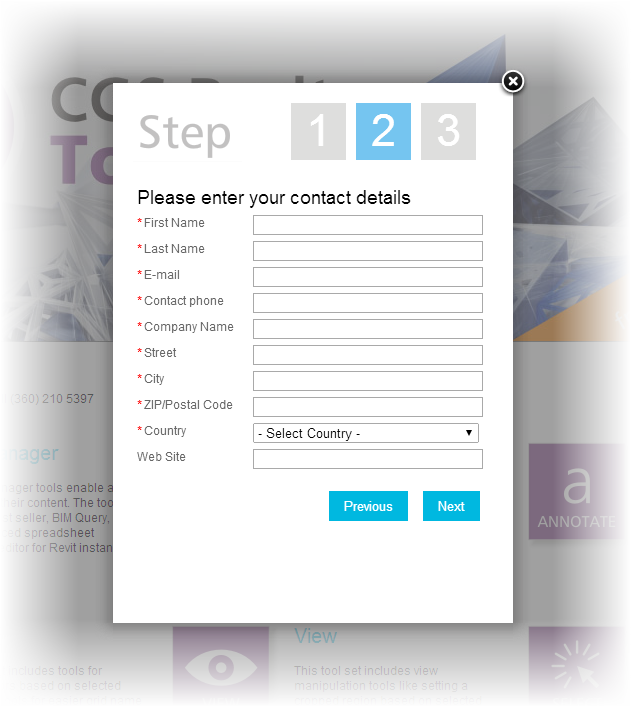
On the downside, the trial registration process felt a little too invasive to me. Requiring a phone number in this day and age might be a little over the top. I think name, email address, company, city, state/province and country should be enough information for acquiring a trial version of any software.

The registration screen

Setup grade: B

Discoverability

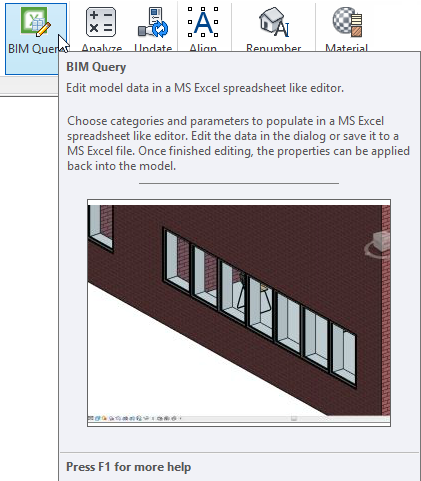
Each tool has Revit-style contextual help within the interface, some with videos.

Contextual help

Sunday, August 17, 2014

Free CGS Revit Family Upgrade Add-in

Family Upgrade

With the Family Upgrade Tools user can upgrade all families from previous version of Revit Architecture to current version. User can choose whole folder to upgrade.

You will save time upgrading Revit libraries of different formats (*.0001, jpg, txt...) with just one click.


There's more information available on the CGS plus website.