Advertisement

Showing posts with label Parameter Management. Show all posts

Thursday, August 6, 2026

PARS-BIM: Architectural Tools

From the Autodesk Design and Make Marketplace:

Built on years of hands-on modelling experience, this plugin is designed to dramatically speed up your workflow while saving both time and costs. With powerful automation tools and smart features, it takes the repetitive, time-consuming tasks out of your hands—so you can focus on design.

Here’s what it can do for you:

Common Tools (Included in all versions)

  • View & Template: Rapidly duplicate views and standardize templates across projects.
  • Sheet Automation: Re-number, manage, and batch-create sheets from Excel.
  • Family Placement: Precision-place families on CAD blocks or ceilings automatically.
  • Selection & Filtering: Save selection rules, automate V/G filters, and group elements by level/type.
  • Clash Coordination: Sync Navisworks clash reports or manage internal model collisions with instant navigation.
  • Annotation & Data: Automate Marks, sync parameters, batch-tag elements, and clean up schematic line intersections.

Architecture Tools (Exclusive)

  • Room & Interior: Auto-generate wall/floor finishes and visualize ceiling height legends.
  • Auto-Modeling: Convert 2D CAD files to 3D BIM elements (walls/doors/windows) and auto-join structural components.
  • Magic Dimensioning: One-click auto-dimensioning for Grids, Windows, and Wall openings.
  • Level Automation: Instant creation of single or multi-level building structures based on custom rules. 

Thursday, February 6, 2025

IMAGINiT Utilities for Revit 2025 Includes More than 50 Tools!

From the IMAGINiT website:

IMAGINiT Utilities for Revit

The Indispensable Time Savers for the Autodesk Revit Platform

All of the IMAGINiT Utilities for Revit are designed to enhance your capabilities within Autodesk Revit. Created by IMAGINiT’s software development team in response to common client requests, these utilities seamlessly integrate into Revit, streamlining tasks and eliminating the need for manual, time-consuming work. The IMAGINiT Utilities are available in Standalone or Network versions, each available as a subscription or perpetual license. Annual licenses are available free to clients who have an annual or multi-year subscription to Autodesk products with IMAGINiT.

More Than 50 tools to Improve your Revit Experience!

Schedule from Excel

The new Excel Import feature caters to a wide range of Revit users, allowing easy integration of nonBIM data into the building information model (BIM). This tool effortlessly incorporates Excel checklists, abbreviations, general notes, keynotes, and other data into the model, with fast and precise calculations, eliminating countless hours to recreate data

Project/Template Report

Power users, such as BIM managers and project coordinators will appreciate the Project/Template Report tool which automatically documents necessary data, eliminating manually running comparisons and documenting standards

Tuesday, June 11, 2024

Free Family Manager Ez

From the Autodesk App Store:

Description

Family Transfer & Manager is a free Autodesk® Revit® add-in/plugin to help you to manage Revit families and parameters.

The app only supports Revit 2022 & above.

How it will help you?

1. Parameters:

  • Rename parameters, you can add prefix, suffix or remove any words to all parameters.
  • You do not open family but can quickly set formulas, delete parameters
  • if you select multiple families at the same time, you can modify the same parameters between them.
  • Copy formula from a family to other families

2. Families:

  • Easy selection: Easily select the required Families
  • Transfer command: Transfer all families between 2 projects (or from a linked project)
  • Purge command: Purge all unused families, except annotation families.
  • Export command: Export families to one folder or category folder
  • Observation Mode: To find and isolate your family in the active view & also detect and unhide hidden family

Thursday, April 14, 2022

Naviate Accelerate: A Productivity Suite of 50+ Tools

From the Autodesk App Store:

Description

The core in Naviate for Autodesk® Revit®

In Naviate Accelerate you will find all the common specifications and features for your Naviate for Revit. With your chosen discipline on top, you will have access to the Naviate best suited for your work tasks and project planning. 

The common ground in the industry

Naviate Accelerate contains all the features found across the AEC industries, from collaboration, productivity and documentation. With best-practice workflows and task management like Family Browser, Filter Elements, Sheet Manager, and Edit Parameters to mention a few.

Filter Elements

Filter any object based on type or instance parameter value from the entire project. You can combine filters and save them for reuse. If it's in Revit you can filter it.

Filter any object based on type or instance parameter value from the entire project.

Sunday, February 20, 2022

DiRoots.One: Eight Free Bundled Productivity Tools

From the DiRoots website:

Eight Productivity Tools for Autodesk Revit.

DiRootsOne 1.0.2.0

A single application bundle that includes 8 free Autodesk Revit Plugins to boost your productivity. DiRootsOne allows seamless interoperability between our plugins, opening doors to new workflows and ways for getting your job done faster and better.

One Bundle, 8 Free Revit Plugins to make your life easier.

SheetLink

Export your Revit model data (by categories, elements, schedules) to Excel and Google Sheets. Edit the data and import it back to update the model.

MORE DETAILS

Tuesday, February 1, 2022

Free 5DV Productivity Tools

From the Autodesk App Store:

Description

The tool helps to increase the following-

1. The "AddParameter" function   gives access to additional parameters of Autodesk® Revit® elements such as -

IfcVolume - Single parameter for volume of all elements including stairs.This makes it possible to get the stair volume in the assemble also.

IfcLevel - Level data stored in the same parameter for all elements. This lets you sort and filter in multicategory schedules and, create viewfilters in links.

2. The "Join Geometry" function allows you to join intersection elements together in Revit.

3.The "Transfer Parameters" function allows you to copy paste text parameter values from one parameter to another.


Monday, January 24, 2022

Free CopyElementLayers — Copy Layer Information to Type Parameters

From the Autodesk App Store:

Description

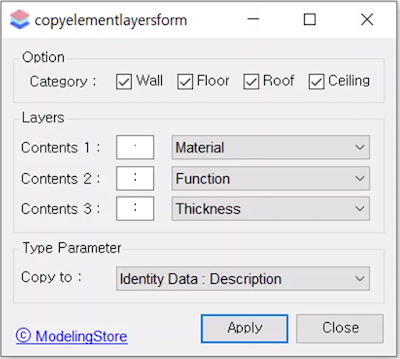
This app copies the layer information of wall, floor, roof, and ceiling elements to specific type parameters.

These elements have layers, which contain information about function, material, and thickness.

Users can set the desired category, layer information, and type parameters.

Pressing the Apply button copies these layer information in text form to the selected type parameter.

The entered information can be expressed in the drawing by using the tag.

This app saves you time annotating to describe the layers of wall, floor, roof, and ceiling elements.
Please note that the copied content is not automatically updated when the layer is changed.


Saturday, December 25, 2021

Free DocuGrid — Assigns Grid Locations to Element Parameters

From the Autodesk App Store:

Description

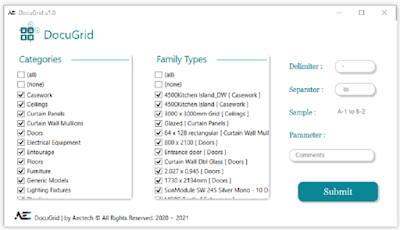
DocuGrid detects model elements' respective grid locations and writes them to the element's parameter.

How to?

  1. Select Categories & Family Types ( Or all of them )
  2. Input Parameter
  3. Modify output Delimiters & Separators
  4. Run the App!

Show element's grid locations in schedules! Tag your elements! Tell us what you're using DocuGrid for!


Wednesday, December 8, 2021

Free Fab Parameters

From the Autodesk App Store:

Description

Autodesk® Revit® Tags are not allowed to read all Fab Parameter values. By creating Shared Parameters and assigning them to the MEP Fabrication Categories you can use the add-in to fill them with the Fabrication Part values.

Saturday, November 13, 2021

DocuZone — Write Respective Zone Names to Elements' Parameters

From the Autodesk App Store:

Description

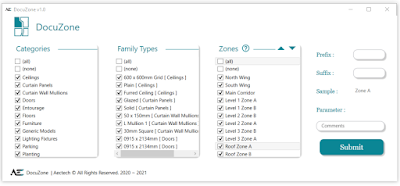
DocuZone detects elements within Zones (Scope Boxes), and writes respective Zone names to elements' parameter.

How to?

  1. Select Categories, Family Types & Zones (or all of them!)
  2. Input Parameter
  3. Modify output Prefix & Suffix
  4. Run the App!

Show Element zones in schedules! Tag your elements! Tell us what you're using DocuZone for!

ID Stamper

From the Autodesk App Store:

Description

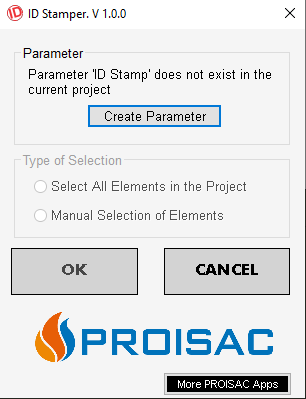
With ID STAMPER you will be able to store the "ID" data of any element in a Shared Parameter named: "ID Stamp".

This parameter can be displayed in SCHEDULES to improve your data output.


Sunday, October 31, 2021

Batch Apply Shared Parameters to Batch of RVT File

From the Autodesk App Store:

Description

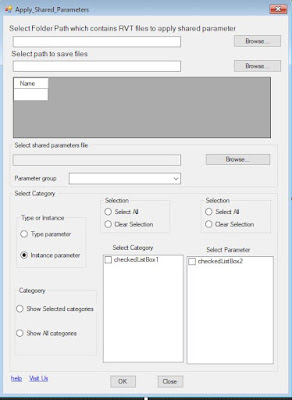
The tool is designed to batch apply the shared parameter from .txt file to a batch of RVT files placed in folder or subfolders

The tool will save a lot of time and enhance Autodesk® Revit® file performance.


Tuesday, October 26, 2021

BIM SOFT SOLUTIONS All Tools Package

From the Autodesk App Store:

Description

This package contains 7 main packages which contains 100 applications and it will accelerate your work in Revit 

1. BIM SOFT Tool Package  

This application contains 31 useful tools to facilitate work in Autodesk® Revit®.

https://apps.autodesk.com/RVT/en/Detail/Index?id=1165803831326783009&appLang=en&os=Win64

2. MEP Package

This application contains 31 useful tools to facilitate work with MEP systems in Revit.

https://apps.autodesk.com/RVT/en/Detail/Index?id=5142239976732836819&appLang=en&os=Win64

3. Sheet & views Packages

This application contains all the tools needed to work with sheets and views in Revit.

https://apps.autodesk.com/RVT/en/Detail/Index?id=5700019929706677793&appLang=en&os=Win64

https://apps.autodesk.com/RVT/en/Detail/Index?id=4838664307517378543&appLang=en&os=Win64

Saturday, October 9, 2021

Transfer Data from Space to Family

From the Autodesk App Store:

Description

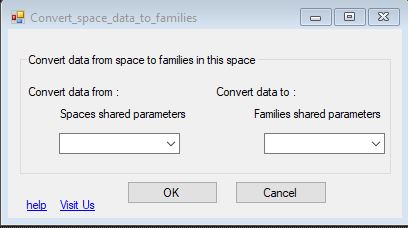
This tool will transfer shared parameter data from space to all the elements inside the space.

This will be helpful for facility management and other BIM related purposes.


Transfer Data from Rooms to Family

From the Autodesk App Store:

Description

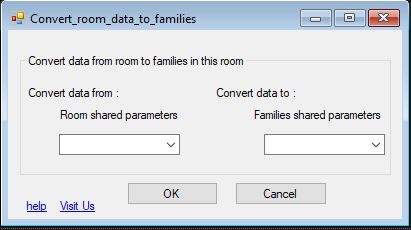
This tool will transfer shared parameters data from space to all the elements inside this space.

This app is needed for facility management purposes and other BIM related purposes.


Friday, October 8, 2021

Transfer Data from Room to Space

From the Autodesk App Store:

Description

This tool will transfer shared parameter data from room to space.

It works if the rooms are in the same file along with the spaces or if the rooms are in a linked file.

This will be helpful for facility management and other BIM related purposes.

Saturday, October 2, 2021

Free ParaManager

From the Autodesk App Store:

Description

A free plugin for Autodesk® Revit® that allows you to manage Revit parameters inside the project and family environments.

General:

  • Create new parameters
  • Modify existing parameters
  • Export/Import parameters from Excel and Shared Parameters file
  • Create, edit, and merge shared parameters files using the embedded Shared Parameters Editor.
  • Add properties to parameters such as User Modifiable, Visibility, Description, Hide When no Value, and Groups.

Model:

Transfer and modify parameters from source to one or multiple destination families without opening families

Family:

Connect and create Nested instance parameters

Sunday, September 19, 2021

BIMright — "A Suite of Powerful Features that Automates Work Within Revit"

From the Autodesk App Store:

Description

Watch the video on how to create smart schedules in Autodesk®Revit®, and bypass Revit limitations by using BIMright. Click Here

BIMright is a suite of powerful features that automates your work within Revit which saves Revit users hours of time and ensures data efficiency.

Here is the list of features:

Data Reference - A live reference to data in the project, for example, the total of the length parameter of all walls of a specific level, and then you can bind it to a text note to update text in your project as you change the model, or you can bind it to global parameters so you can use it with formulas.

Text Note Binding - This allows you to bind a Text Note to a Data Reference, Project Information or Global Parameter so it will be updated with live project data as you change the model, and you can also bind to a cell in a linked Excel file.

Bind Text Note to Data Reference.

Wednesday, September 15, 2021

ArchFamily — Insert Multiple Shared Parameters from Multiple Parameter Groups at Once

From the Autodesk App Store:

Description

The ArchFamily application allows you to insert multiple Shared Parameters from multiple Parameter Groups at once in family files, saving you time. ArchFamily also helps create formulas for parameters in family files with accurate spelling and reduced typing time.

Insert Multiple Shared Parameters at once vs one at a time.

Tuesday, September 14, 2021

Assign Parameter Value

From the Autodesk App Store:

Description

Assign Parameter Value allows the user to take the value of one parameter and assign it to another parameter, the user can select a parameter from the selected object or host, or level.

Users can check the Id of the object by creating a parameter named Element Id and running the Add-in to assign a value to the parameter.