Advertisement

Showing posts with label Sheets. Show all posts

Thursday, February 6, 2025

IMAGINiT Utilities for Revit 2025 Includes More than 50 Tools!

From the IMAGINiT website:

IMAGINiT Utilities for Revit

The Indispensable Time Savers for the Autodesk Revit Platform

All of the IMAGINiT Utilities for Revit are designed to enhance your capabilities within Autodesk Revit. Created by IMAGINiT’s software development team in response to common client requests, these utilities seamlessly integrate into Revit, streamlining tasks and eliminating the need for manual, time-consuming work. The IMAGINiT Utilities are available in Standalone or Network versions, each available as a subscription or perpetual license. Annual licenses are available free to clients who have an annual or multi-year subscription to Autodesk products with IMAGINiT.

More Than 50 tools to Improve your Revit Experience!

Schedule from Excel

The new Excel Import feature caters to a wide range of Revit users, allowing easy integration of nonBIM data into the building information model (BIM). This tool effortlessly incorporates Excel checklists, abbreviations, general notes, keynotes, and other data into the model, with fast and precise calculations, eliminating countless hours to recreate data

Project/Template Report

Power users, such as BIM managers and project coordinators will appreciate the Project/Template Report tool which automatically documents necessary data, eliminating manually running comparisons and documenting standards

Sunday, July 14, 2024

CUKON – For Working with Structural Reinforcement

From the Autodesk App Store:

Description

TagAll button will tag all structural rebars in an active view. In settings you can select witch rebar tag do you want to use for multi rebar annotation or for single rebar annotation. Also if you Override Graphic in View → By Element → Halftone, TagAll button will ignore this rebars.

Thursday, June 13, 2024

Export Sheets to DWG

From the Autodesk App Store:

Description

At present, when exporting from Autodesk® Revit® to DWG, each sheet is exported as a separate file, therefore, if you want one single DWG with all drawings and sheets, it has to be combined manually or by importing each layout in CAD.

This Add-in will make your work easier to export with the help of these two tools:

  • "To 1 layout" command: Export multiple sheets to one DWG file, with all drawings in the model tab and all sheets in 1 layout tab.
  • "To Multiple Layouts" command: merge all sheets to one DWG file with multiple layouts.

Use this plugin with Autodesk® AutoCAD® add-in: "Merge Drawings" to get better results.

Wednesday, June 12, 2024

Free Align Views & Rename Sections

From the Autodesk App Store:

Description

This plug-in for Autodesk® Revit® can help to save time while aligning multiple drawings with large sets of views and schedules.

Main features:

  1. Align Views: just select a few elements and the align view tool will sort them for you. Only the sheets which have the same amount of view as the model sheet can be selected.
  2. Rename Sections: automatically rename section and section detail number.
  3. Rename Sheets: automatically rename sheet and sheet number.
  4. Copy legend: copy legends or schedules across sheets.
  5. Rotate the current view.

Saturday, June 8, 2024

Fab2018 and BIMREV – Structural Automation for Reinforcing, Sheets and Annotation

On LinkedIn, Sena Kahraman has been posting about her company's BIMREV add-in. Here's what we know about it...

From LinkedIn (links are to posts with videos)...

We have completed the scissor reinforcement of our BIMREV software, which we are developing with C# Revit API. Now you can use the BIMREV software, which we automate without wasting time, for the equipping of prefabricated elements. Post: https://bit.ly/4c8rBYg

With our BIMREV addin, which we continue to develop, you can now automatically reinforce the gutter element. Post: https://bit.ly/3RnLiDt

With our BIMREV addin, which we continue to develop, you can automatically reinforce the purlin element. Post: https://bit.ly/3VytvvQ

With our BIMREV addin, which we continue to develop, you can automatically put reinforcement in the crane beam element. Post: https://bit.ly/3XagXfq

With our BIMREV addin, which we continue to develop, you can automatically put reinforcement in the Double T Slab element. Post: https://bit.ly/3z2XyCX

Monday, May 27, 2024

Product Roundup – Free Apps from DiRoots

From the DiRoots website:

DiRoots Apps

DiRoots App Manager

A standalone desktop application to install/update DiRoots Applications and to enable/disable Revit Plugins.

DiRootsOne

8 Autodesk Revit Productivity Tools for Data Management, Filtering, Model Checking, Drawing Production, Point Clouds, etc. Includes SheetLink, FamilyReviser, OneFilter, TableGen, SheetGen, ReOrdering, ParaManager, PointKit.

ProSheets

Autodesk Revit Add-in to export Views and Sheets to PDF, DWG, DGN, DWF, NWC, IFC, and IMG (JPEG, PNG, TIFF).

Thursday, April 14, 2022

Naviate Accelerate: A Productivity Suite of 50+ Tools

From the Autodesk App Store:

Description

The core in Naviate for Autodesk® Revit®

In Naviate Accelerate you will find all the common specifications and features for your Naviate for Revit. With your chosen discipline on top, you will have access to the Naviate best suited for your work tasks and project planning. 

The common ground in the industry

Naviate Accelerate contains all the features found across the AEC industries, from collaboration, productivity and documentation. With best-practice workflows and task management like Family Browser, Filter Elements, Sheet Manager, and Edit Parameters to mention a few.

Filter Elements

Filter any object based on type or instance parameter value from the entire project. You can combine filters and save them for reuse. If it's in Revit you can filter it.

Filter any object based on type or instance parameter value from the entire project.

Wednesday, February 23, 2022

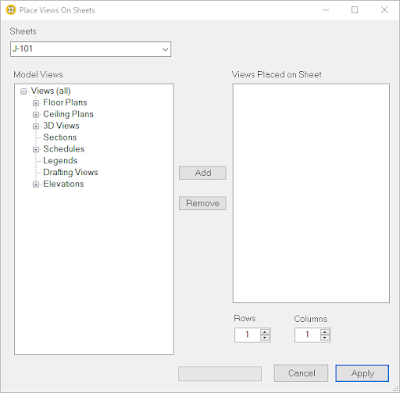
Place Multiple Views On Sheets

From the Autodesk App Store:

Description

This tool is designed to place multiple views on sheets with a desired arrangement automatically 

This add-in will save a lot of time in the project.


Monday, February 21, 2022

Free Sheetori: Helps to Manage Sheets in a Smart Way

From the Autodesk App Store:

Description

Sheetori is one of the BIM Ninja specific sets of Autodesk® Revit® plug-ins, It helps you manage your project sheets easily in a smart way.

It will help you: 

  • Batch create your sheets allowing you to assign your own browser organization parameters and titleblock.
  • Easily apply and overwrite the required revisions for your submission sheets.
  • Batch print your submission into your selected location using timestamps and folder organization.
  • Supports (PDF), (DWG) & (DWF) extensions for the outcome of your submission.
  • Supports all the known sizes of titleblocks along with allowing control of the output file properties.

This app requires a lite free PDF printing tool called (PDF24). It can be downloaded from here: https://en.pdf24.org


Sunday, February 20, 2022

DiRoots.One: Eight Free Bundled Productivity Tools

From the DiRoots website:

Eight Productivity Tools for Autodesk Revit.

DiRootsOne 1.0.2.0

A single application bundle that includes 8 free Autodesk Revit Plugins to boost your productivity. DiRootsOne allows seamless interoperability between our plugins, opening doors to new workflows and ways for getting your job done faster and better.

One Bundle, 8 Free Revit Plugins to make your life easier.

SheetLink

Export your Revit model data (by categories, elements, schedules) to Excel and Google Sheets. Edit the data and import it back to update the model.

MORE DETAILS

Tuesday, January 11, 2022

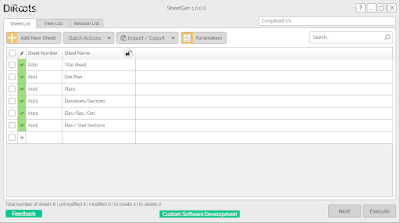
Free SheetGen

From the Autodesk App Store:

Description

A free add-in that allows you to create multiple Drawings Sheets, place Views based on a pre-defined template, and easily manage Drawing Sheet Revisions.

Main features

  • Create multiple Drawings Sheets
  • Place Views on Sheets based on a pre-defined template
  • Manage Drawing Sheet Parameters
  • Manage Drawing Sheet Revisions
  • Manage Views (duplicate, delete and edit Parameters)


Sheets by View

From the Autodesk App Store:

Description

This add-in will help you to select your desired views in an Autodesk® Revit® file to create a sheet for each of them simultaneously.

By this app, You can set the title block used in sheet, sheet number, and sheet name in a table and multiple sheets will be created from selected views.

Also, you could set the location of the view inside its title block. This feature provides two options for you:

  • Pick a point inside the title block as the center point of the viewport
  • Or pick two points to create a region. And automatically, the center of this region will set as the center of the viewport. Also, by this option, you could simply define the margins of the title block to create the available region inside it.

NOTICE: During running this plugin you could use Revit and modify your model (It uses modeless forms). However, you could not edit the views or sheets name and number, or delete them (If you do, Revit will show you an error to prevent unwanted changes).

Monday, January 3, 2022

Drawing Central

From the Autodesk App Store:

Description

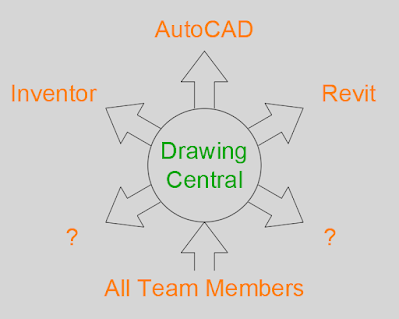
Drawing Central’s main purpose is to save Drafters (and Engineers) time and effort. One way to assist this noble cause, is to reduce confusion. Questions like “How many electrical drawings are ready for issue?” and “You want me to rev-up 50 drawings before lunch?” can easily be answered by creating your own drawing registration system. But “where is the register?”. More confusion. I think you get the point!

This is where Drawing Central comes in by managing a project-based configuration system to reduce confusion. It also has an extremely easy to use interface. Once your drawing has been configured it knows exactly where to find the project file and therefore the correct drawing register. This allows for the other part of the equation Automation. Now you have this “link”, you can automatically update (or sync) your drawings with the latest project data. No more confusion.

Question: Do you know how good it feels to just sit back and watch 100 title block items change before your eyes? No? Well, now you know how to find out.

Drawing Information Workflow

Thursday, December 16, 2021

K.Tools

From the Autodesk App Store:

Description

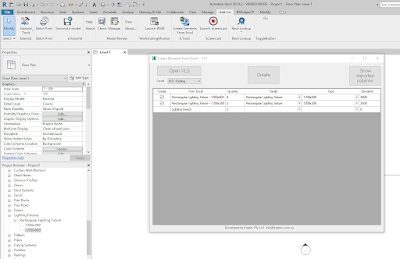
Create Elements From Excel will help you to create groups of non-hosted elements in the model by coordinates and rotation angle exported from an Excel document (xls /.xlsx).

Create Elements From Excel

Sunday, December 12, 2021

Holixa Tools — A Productivity Suite Featuring Many, Many Tools

From the Autodesk App Store:

Description

Set of productivity tools for Autodesk® Revit® 2022, 2021 and 2020. Contains tools like a job-time tracker, reference list, wall openings, compound structure annotation, room floors, dimensioning tools, left/right door opening schedules, room renumbering, duct renumbering, duct splitting, export schedule to Excel, watermark/sign BIM documents, create anaglyph image from 3D view, change the text to upper, lower or title case and replace by using regular expression and create the legend of selected doors, windows, etc. and their selected parameters; extended filter for element selection, wall-pipe dimensions, export/import of schedules (bidirectional), mass join geometry, door swings in curtain walls, sheet scales, sheet formats, type legend, text alignment, command line, project purging, batch publishing to PDF, importing Autodesk® Civil 3D® terrain and direct access to thousands of RFA families.

Online tools for accessing RFA families. Compatible with Revit 2022, 2021 and 2020. The trial version is limited to 15 days of using and have some small limitation in function.


Saturday, December 11, 2021

SheetComposer

From the Autodesk App Store:

Description

This addin will help you with composing sheets by adding placement information, using a metalanguage, in a text parameter. No more align guides or manual placement. Just three simple steps, create "SheetComposer" parameter, store placement instruction for each view (see the documentation for details) and run SheetComoser at sheet.


Saturday, December 4, 2021

Ideate Software Bundle

From the Autodesk App Store:

Description

Firms that deploy Ideate Software widely enjoy increased benefits. Install all Ideate Software solutions from a single download and empower your team to be less focused on time-consuming Autodesk® Revit® activities.

Ideate BIMLink is the Revit data management solution that lets you pull and push volumes of information from a Revit file — Architecture, Structure, and MEP — into user-friendly Microsoft® Excel® with speed, ease, and accuracy.

Friday, November 19, 2021

View/Sheet Assistant

From the Autodesk App Store:

Description

This plug-in helps you to quickly manage and modify the sheets/views in the project.

You can do the following:

  1. Batch Auto Rename Sheets based on Views inside
  2. Batch Auto Renumber Sheets
  3. Batch Auto Rename - Renumber Section Views inside any Sheets
  4. Crop View and Copy Crop Region from a view to other views
  5. Auto Create Sheets with selected views inside
  6. Insert multiple views to one-sheet
  7. Auto Scale your views or scale multiple views at one click
  8. Over Graphic multiple views
  9. Batch Set ViewTemplate
  10. Batch Align Views in sheets
  11. Set Viewtile VisibleOn or Off at one click
  12. Set Original Number for sheets
  13. Duplicate Views or Sheets at one click
  14. Batch copy Legends or Schedules from a sheet to other sheets
  15. Batch delete views or sheets
  16. Run multiple functions at the same time

Wednesday, November 17, 2021

Free BIMicon Toolbar — A Suite of Tools

From the Autodesk App Store:

Description

BIMicon Toolbar for Autodesk® Revit® has been designed for professionals in the AEC industry to quickly document and coordinate construction drawings. 

Among the many tools that help with common tasks are:

  • Create interior elevation markers by selecting rooms and place the newly created views on sheets. It will completely remove the tedious task of manually placing interior elevation markers and dragging these views onto sheets.
  • Duplicate sheets
  • Place active view on sheets
  • Create floors following room boundaries, allowing to instantly create floor finishes.
  • Number family instances sequentially following a selected curve; parking spaces, rooms, or any family instance with a parameter. Never again number them manually one by one!
  • Number doors and windows after room numbers. In a few clicks, you will number all doors and windows after a standard naming system. The benefits are a coherent drawing set, and doors and windows can be easily identified in schedules.
  • Create an Excel table with all the warnings classified in order of importance. It allows team members to focus on critical warnings that affect the integrity of the documentation and the performance of the model instead of trying to fix all trivial warnings.
  • Open a project, workshared or single user, with all selected types of links unloaded. The ability to open a file with Revit file links unloaded can reduce the initial loading time by more than 90%.

There are many more useful tools in the toolbar. Please check the documentation page for more information.

Thanks for looking for better ways to extract value from BIM.


Tuesday, November 9, 2021

Free Tiny Tools

From the Autodesk App Store:

Description

This is a collection of a few simple, yet very powerful, tools for Autodesk® Revit®. The tools are useful to draftsmen who want to shrink production time significantly. Each plugin from this collection has been created and polished to perfection in collaboration with many architecture studios.

Align Views - Align Views on Sheets. Pick the desired Viewport to align to. Select Views to align.

Duplicate Views - Select Sheets from the Project Browser before executing this command. Note: only works if the Project Browser is docked to the Revit window.

Duplicate Sheets - Select Sheets from the Project Browser before executing this command. Note: only works if the Project Browser is docked to the Revit window.

Sheets from Views - Creates multiple Sheets from the currently selected Views and places them on the Sheets.

Bulk Rename - Rename Views or Sheets in Bulk. Select Views or Sheets from the Project Browser before executing this command.