Advertisement

Showing posts with label Project Maintenance. Show all posts

Thursday, February 6, 2025

IMAGINiT Utilities for Revit 2025 Includes More than 50 Tools!

From the IMAGINiT website:

IMAGINiT Utilities for Revit

The Indispensable Time Savers for the Autodesk Revit Platform

All of the IMAGINiT Utilities for Revit are designed to enhance your capabilities within Autodesk Revit. Created by IMAGINiT’s software development team in response to common client requests, these utilities seamlessly integrate into Revit, streamlining tasks and eliminating the need for manual, time-consuming work. The IMAGINiT Utilities are available in Standalone or Network versions, each available as a subscription or perpetual license. Annual licenses are available free to clients who have an annual or multi-year subscription to Autodesk products with IMAGINiT.

More Than 50 tools to Improve your Revit Experience!

Schedule from Excel

The new Excel Import feature caters to a wide range of Revit users, allowing easy integration of nonBIM data into the building information model (BIM). This tool effortlessly incorporates Excel checklists, abbreviations, general notes, keynotes, and other data into the model, with fast and precise calculations, eliminating countless hours to recreate data

Project/Template Report

Power users, such as BIM managers and project coordinators will appreciate the Project/Template Report tool which automatically documents necessary data, eliminating manually running comparisons and documenting standards

Thursday, September 19, 2024

RV DeepClean – All Revit Model Cleaning Functions in One Place

From the RV Boost website:

Is your Revit file size getting out of control? Use RV DeepClean to make your Revit model light, fast and easy to share again! Get a free trial below to enjoy:

Over 40 (and growing!) battle-tested cleaning functions, All in one place,

Options to clean your Revit file as much or as little as you want,

Applying your BIM standards while reducing file size.

GET IT FREE HERE!

Sunday, June 16, 2024

Free LineCleaner – Purge and Convert Lines Faster

From the Autodesk App Store:

Description

Save time while importing CADs by finding and removing those overlapping lines that pack up your models. LineCleaner is a time saver app, helping users delete all duplicated lines in a project. Just click the button and do the magic!

LineCleaner features 3 capabilities, just open any window in the model and...

(1) Option 1: Click to remove coincident lines. This option helps you clean all those duplicated detail or model lines.

(2) Option 2: Click to remove lines shorter than a specific amount. You may set this amount in "mm" or "in". Very helpful when importing and exploding CAD details into Revit.

(3) Option 3: Click to convert model lines into symbolic / detail lines in an unbeatable time! Use this option to do the work much faster than the own Revit tool.

For more BIM Manager tools please visit shop.bimize.com

Friday, January 21, 2022

Free Project Wipe-Out

From the Autodesk App Store:

Description

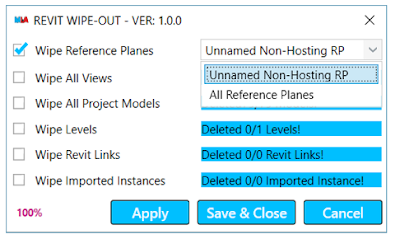
The app will help you to clean your project. You do not need to manually delete all the things.

Main functions:

  1. Wipe reference planes
  2. Wipe all views
  3. Wipe all levels
  4. Wipe all Autodesk® Revit® links
  5. Wipe all Imported instances


Wednesday, December 22, 2021

Remove Duplicates

From the Autodesk App Store:

Description

This tool is designed to remove duplicates for model elements Line-based such as (Cable trays, Ducts, Pipes, Conduits, Beams ...etc) and Point-Based such as (Lighting fixtures, Electrical fixtures, Electrical Equipment, Lighting devices, Air Terminal, Sprinklers, Fire Alarm, and Data Devices ...etc) and Sketch-Based such as (Floors, Ceilings, Roofs), this add-in will save a tremendous amount of time in the project.


Wednesday, December 15, 2021

Line Style Manager

From the Autodesk App Store:

Description

Cleaning up line styles in your project has never been so easy. With just a few clicks, you can clean up all of your lines across multiple views throughout your entire project!!

Either clean them up on a per-view basis or all at once!

Navigate to the view you would like to clean, click the button and see all of your lines in this view and across your entire project!

From there you can:

  1. Delete empty line styles from your project.
  2. Select one or more lines and change their line styles to a single line style
  3. Find where else a line style occurs in the project with the "Search Project" button. 
    1. On the Search Project Dialog, you can find where else the line occurs and jump to that view. Or
    2. You can select multiple line types again and change those to a single line type!

Cleaning up your line types has never been easier!

Sunday, December 12, 2021

Holixa Tools — A Productivity Suite Featuring Many, Many Tools

From the Autodesk App Store:

Description

Set of productivity tools for Autodesk® Revit® 2022, 2021 and 2020. Contains tools like a job-time tracker, reference list, wall openings, compound structure annotation, room floors, dimensioning tools, left/right door opening schedules, room renumbering, duct renumbering, duct splitting, export schedule to Excel, watermark/sign BIM documents, create anaglyph image from 3D view, change the text to upper, lower or title case and replace by using regular expression and create the legend of selected doors, windows, etc. and their selected parameters; extended filter for element selection, wall-pipe dimensions, export/import of schedules (bidirectional), mass join geometry, door swings in curtain walls, sheet scales, sheet formats, type legend, text alignment, command line, project purging, batch publishing to PDF, importing Autodesk® Civil 3D® terrain and direct access to thousands of RFA families.

Online tools for accessing RFA families. Compatible with Revit 2022, 2021 and 2020. The trial version is limited to 15 days of using and have some small limitation in function.


Wednesday, November 17, 2021

Free BIMicon Toolbar — A Suite of Tools

From the Autodesk App Store:

Description

BIMicon Toolbar for Autodesk® Revit® has been designed for professionals in the AEC industry to quickly document and coordinate construction drawings. 

Among the many tools that help with common tasks are:

  • Create interior elevation markers by selecting rooms and place the newly created views on sheets. It will completely remove the tedious task of manually placing interior elevation markers and dragging these views onto sheets.
  • Duplicate sheets
  • Place active view on sheets
  • Create floors following room boundaries, allowing to instantly create floor finishes.
  • Number family instances sequentially following a selected curve; parking spaces, rooms, or any family instance with a parameter. Never again number them manually one by one!
  • Number doors and windows after room numbers. In a few clicks, you will number all doors and windows after a standard naming system. The benefits are a coherent drawing set, and doors and windows can be easily identified in schedules.
  • Create an Excel table with all the warnings classified in order of importance. It allows team members to focus on critical warnings that affect the integrity of the documentation and the performance of the model instead of trying to fix all trivial warnings.
  • Open a project, workshared or single user, with all selected types of links unloaded. The ability to open a file with Revit file links unloaded can reduce the initial loading time by more than 90%.

There are many more useful tools in the toolbar. Please check the documentation page for more information.

Thanks for looking for better ways to extract value from BIM.


Saturday, September 4, 2021

Loose Elements

From the Autodesk App Store:

Description

Loose Elements for Autodesk® Revit® is a tool to pinpoint and identify by ID all elements that are loose/flying elements:

Providing for each element selected the distance to the closest architectural or structural element.


Wednesday, September 1, 2021

Realtime Toolkit

From the Autodesk App Store:

Description

Realtime Toolkit is a suite of utilities that automate common tasks in Autodesk® Revit®. Individually, these tasks are simple and mundane, however they are time-consuming, error-prone, and tedious. Moreover, they are tasks that most Revit users will (or should) carry out on a regular basis. Development of Autodesk® AutoCAD® utilities is ongoing and will be released at a future date.

The tools deliberately avoid high-end BIM analysis and functionality. From experience managing some of the largest mandated BIM projects in the world, significant inefficiencies and losses occur at the desktop, with the individual Revit user. This is a major point of neglect in the deliverables supply chain. We have designed Realtime Toolkit to equip each Revit user with the ability to quickly, easily, and accurately carry out repetitive tasks in order to save time and improve quality.

These savings are real, ongoing, and by virtue of being per user, will reduce documentation costs, to the delight of the Project Manager. Additionally, CAD-BIM Managers have full visibility of all Revit users, their files and system through the Revit Data Collector tool. Aside from Revit user and Revit file information, this tool records opening and closing file sizes and times. Most managers running design teams will have encountered the situation where a Revit project file goes rogue, and determining where, when who, and how is a time-consuming art. The Revit Data Collector will tell the CAD-BIM Manager exactly when a file changed significantly. The data can be imported into any system for analysis and graphing; it could be used to present a project’s health timeline.

All tools have a uniform interface, and are intuitive to use. The functions (and benefits) will be obvious to even inexperienced Revit users. All tools have an option to write a log file of the results.

Family Library Export

Sunday, August 29, 2021

Free Project Sweeper Final

From the Autodesk App Store:

Description

This is the final release of this app. All app production from pkh lineworks is shutting down.

Project Sweeper is a collection of tools that allow a user to quickly and accurately remove the following clutter from Autodesk® Revit® projects:

  • line styles
  • line patterns
  • text styles
  • fill region types and
  • fill patterns.

Except for text styles, these items are not checked by Revit "Purge Unused" command. Project Sweeper goes beyond just checking for unused styles and patterns. It also allows a user to convert from one style\pattern to another, delete all the elements using a style\pattern and to preview all the views\elements using a style\pattern before removing it.

Sunday, October 6, 2019

CTC BIM Batch Suite 2020 v20.0.3

From the Autodesk App Store:

About This Version

Version 20.0.3, 8/14/2019

Project Processor --
New Feature:  File opening options: open detached, open and audit
New Feature:  Purge line patterns and fill patterns
New Feature:  File tasks can be reordered by dragging tab headers
New Feature:  Clearn line styles, fill patterns, viewport types
New Feature:  Parameter value options listed for and sheets are now dependent upon selected parameter
New Feature:  Clear settings button added

Plotter and Exporter --
Enhancement:  You can now export Model Compare files for projects with duplicate non-shared project parameters
Bug Fix:  Fixed an issue that prevented printing (including to PDF) to work when running on a schedule

Description

This setup will install add-in tools for Autodesk® Revit® 2017, 2018, 2019 and 2020.

BIM Batch Suite provides tools to allow Revit users to process workflows en masse, with a focus on importing and exporting data.

Family Exporter (free)

This tool allows users to easily select specific families to export from projects, automatically create folder structure based on family categories and geometry, and add customized text to exported family names.

Family Exporter

CTC BIM Manager Suite 2020

From the Autodesk App Store:

About This Version

Version 20.0.3, 8/14/2019

Import and Link Manager --
New Feature:  Point cloud links are supported
New Feature:  On Revit links, the room bounding property can be adjusted

Project Cleaner --
Enhancement:  Improved processing time estimation and alerts with empty/used sort option is selected

Description

To purchase the full version of BIM Manager Suite through Autodesk App Store, click here

This setup will install add-in tools for Autodesk® Revit® 2017, 2018, 2019 and 2020. BIM Manager Suite contains the following tools:

Family Tools (free)

This tool contains a collection of utilities that assist with the family creation process, including: Deleting backup families, working with type catalogs and shared parameter files, listing the version of Autodesk® Revit® in which families were last saved.

Family Tools

Saturday, October 5, 2019

Warnings and Cleaning Package

From the Autodesk App Store:

This application contains 8 useful tools for file purging and cleaning.


Purge CAD Drawings

his tool is designed to purge unneeded Autodesk® AutoCAD® files from Autodesk® Revit® model.

It will remove the imported CAD and linked CAD drawings from your file.

Sometimes users link the same CAD drawing many times and this affects the performance of the Revit model. The tool will tell you about how many times you inserted the same CAD drawing. This will improve file performance and reduce the file size.

Purge Scope Boxes

This app provides more automation for scope box workflow.

The tool is designed to purge the scope boxes automatically.

urge (Unplaced spaces / Unplaced Rooms)

Usually, the user needs to create room or space schedules to delete unplaced rooms or spaces.  This tool is designed to delete unplaced rooms or spaces without the need to create a schedule, saving the user a lot of time.

Purge Unused Filters

The tool is designed to purge unneeded filters from the Revit model.

This will be very useful when submitting files to the client the files will only include needed filters.

Monday, May 13, 2019

Free EnTools Broom – Delete Unwanted Views, Sheets, Legends and Schedules

From the Autodesk App Store:

Entools Broom will enable to you easily delete unnecessary views, sheets, legends or schedules from the sample Revit.

You just need to specify the name of views you must save and press OK. The app will analyze all views and will delete only the unnecessary ones.

Entools Broom is what you need if you don’t have time to clean the sample.


Friday, March 1, 2019

CTC BIM Batch Suite 2019 v19.0.3

From the Autodesk App Store:

About This Version

Version 19.0.3, 3/1/2019

NEW TOOL:  Project Processor.
This tool can run scripts, remove backup files, clean, purge, swap types and materials, rename elements, add shared parameters and manipulate links on multiple projects at once.

Projects and Families Upgrader –
Enhancement:  Tool available to run even if a project is not open in Revit

Family Loader –
  • New Feature:  Save and recall lists of families to reload into projects
  • Enhancements:  
    • For workshared models - new operations: open new local, sync to central, relinquish borrowed
    • More detailed logging of load operations
    • Tool available to run even if a project is not open in Revit

This setup will install add-in tools for Autodesk® Revit® 2016, 2017, 2018 and 2019.

BIM Batch Suite is part of the CTC Express Tools family of products.  It provides tools to allow Revit users to process workflows en masse, with a focus on importing and exporting data.

CTC BIM Manager Suite 2019 v19.0.2

From the Autodesk App Store:

About This Version

Version 19.0.2, 3/1/2019

NEW TOOL:  Manage Revit Project Links
This Windows Explorer pop-up menu tool can be used to modify link paths within Revit files without first opening the files in Revit.

Family Processor
  • Enhancements:  
    • The Family Processor button will now be disabled when in a project (it must be opened only when in a family)
    • Built-in parameters that have been initialized will now be included in type catalogs generated
  • Bug Fixes:
    • Parameters that had not been initialized were erroneously being included in type catalogs generated.
    • During type catalog generation, families for which the only change was to delete the types were not being resaved.
    • Type catalog files generated for Revit 2016 and 2017 did not have correct column headers for Currency and Number unit types.

Tuesday, February 26, 2019

Revit Project Organizer – Includes 248 Tools

From the NET Spider Studio:

Revit Project Organizer 2019

Revit Project Organizer 2019 works with Revit 2019, 2018, 2017 and 2016.  It helps organize Revit projects in many different and good ways.

It provides many tool bundles such as Creators, Duplicators, Loaders, Placers, Copiers, Adjusters, Finders, Inspectors, Editors, ReNumbers, Flippers, ReNamers, Exporters, Importers, View Cleaners, Sheet Cleaners, Schedule Cleaners, UnPlaced Cleaners, UnUsed Cleaners, UnExpected Cleaners, Cloud Cleaners, Link Cleaners, File Cleaners, Purgers, Transporters, Closers, Element Gadgets, Text Gadgets, Group Gadgets, Suite Organizer, Selection Organizer, and Material Organizer. It also provides some other nice tools such as Files Upgrader, Events Monitor, Fonts Setter, Failures Handler, Problems Isolator, Issues Fixer, Dialogs Suppressor, Elements Hider/Seeker/Browser, Document Locator, Aliases Namer, and so on in a single package.


It has 248 tools in total so far: (25 for Setup tools, 48 for Process tools, 79 for Refinement tools, 40 for Cleanup tools, 51 for Gadgets, and 5 for Information)

Friday, February 22, 2019

Product Roundup – Free Autodesk BIM Interoperability Tools

From the Autodesk BIM Interoperability Tools website:

AUTODESK BIM INTEROPERABILITY TOOLS

These free Autodesk apps are designed to help architects, engineers, contractors and owners with their Building Information Modeling (BIM) workflows.

Autodesk Classification Manager for Revit
Assign multiple classification systems to multiple elements with a single click

Autodesk Enhanced DWG Exporter for Revit
Improves the DWG Export from Revit, helps overcome a number of limitations of the built-in DWG Export feature, and makes the management of configurations simple and straightforward

Wednesday, July 11, 2018

Batch Purge Files Location's (sic)

From the registration website:

This tool is designed to purge unused project locations.

The tool will save a lot if time used in opening files one by one to delete unused project locations.