Advertisement

Showing posts with label links. Show all posts

Thursday, September 3, 2026

Free Get Linked IDs: Get Element IDs for Linked Elements & Export Them to Excel

Summary

Get Linked IDs is a free Autodesk Revit add-in from IB-BIM that extracts element IDs and related properties from linked Revit models. The tool is aimed at users who work with complex multi-discipline linked models and need a fast way to identify, copy, document, and export information about elements that exist in linked files rather than in the active host model.

Purpose and Design Intent

The main purpose of Get Linked IDs is to make linked-model coordination easier. In Revit, identifying an element in a linked architectural, structural, mechanical, electrical, or plumbing model can be more cumbersome than identifying elements in the current file. This add-in simplifies that task by letting users select elements from linked Revit files, view their IDs in a results window, copy those IDs, and export a more complete data set to Excel.

Core Workflow

The workflow is intentionally simple: the user launches the command, selects one or more elements from any linked Revit file, reviews the collected element IDs in a styled dialog, and then either copies the IDs to the clipboard or exports the selected element information to Excel. Version 1.1.0 also includes an Export & Open option, allowing users to save the Excel file and open it directly from the add-in.

Key Features

  • Select multiple elements from linked Revit files.
  • Display all selected linked element IDs in an organized results window.
  • Copy all collected IDs to the clipboard with one click.
  • Export selected linked-element data to Excel.
  • Include detailed information such as Element ID, Category, Family, Type Name, Link File Name, Level, Workset, Phase, and Mark.
  • Use Export & Open to save and open the Excel output directly.
  • Use safe file export logic intended to handle locked files more reliably.
  • Create Excel files with color-coded headers, auto-filter, and freeze panes for easier review.
  • Access the command from the IB-BIM Tools ribbon tab.

Thursday, February 6, 2025

IMAGINiT Utilities for Revit 2025 Includes More than 50 Tools!

From the IMAGINiT website:

IMAGINiT Utilities for Revit

The Indispensable Time Savers for the Autodesk Revit Platform

All of the IMAGINiT Utilities for Revit are designed to enhance your capabilities within Autodesk Revit. Created by IMAGINiT’s software development team in response to common client requests, these utilities seamlessly integrate into Revit, streamlining tasks and eliminating the need for manual, time-consuming work. The IMAGINiT Utilities are available in Standalone or Network versions, each available as a subscription or perpetual license. Annual licenses are available free to clients who have an annual or multi-year subscription to Autodesk products with IMAGINiT.

More Than 50 tools to Improve your Revit Experience!

Schedule from Excel

The new Excel Import feature caters to a wide range of Revit users, allowing easy integration of nonBIM data into the building information model (BIM). This tool effortlessly incorporates Excel checklists, abbreviations, general notes, keynotes, and other data into the model, with fast and precise calculations, eliminating countless hours to recreate data

Project/Template Report

Power users, such as BIM managers and project coordinators will appreciate the Project/Template Report tool which automatically documents necessary data, eliminating manually running comparisons and documenting standards

Sunday, February 20, 2022

Link Manager

From the Autodesk App Store:

Description

Link Manager will help you to manage your Autodesk® Revit® links and Autodesk® AutoCAD® links. The add-in is very useful and saves time while working with links in your project.

  1. Quick function (select link directly or using control panel dialogue):
  2. Open the file folder
  3. Open file in Revit/ AutoCAD program
  4. Reload From...
  5. Isolate Revit link in the active view
  6. Hide/Unhide
  7. Reload multiple links
  8. Unload multiple links (only for Revit links)
  9. Quick Insert Link (only for Revit links)
  10. Remove multiple links
  11. Close Grid and Level worksets) (only for the work-shared projects)
  12. Copy multiple links to one folder
  13. Quick enable work-sharing (only for Revit links)


Thursday, January 13, 2022

RV RoomLink

From the Autodesk App Store:

Description

To get the latest trial of this app for all Autodesk® Revit® versions since 2016, visit https://rv-boost.com/revit-plugins/rv-roomlink-easily-schedule-revit-objects-by-linked-rooms/

RV RoomLink helps you create associations between elements in one model to rooms in another. Our one-click solution directly pulls room data from Revit links to elements in your main model! With RV RoomLink, it is super easy to:

  • Select Revit links containing required room data
  • Select elements which need room data
  • Set syncing options and Sync

Why not start right now with this free trial with all the available features?

Monday, December 20, 2021

Manage Batch Links

From the Autodesk App Store:

Description

This tool is designed to :

  • Add multiple links into the model and assign them to the desired workset.
  • Reload from existing links by specifying the folder path of the links.
  • Reload all links at once for the unloaded links.

This add-in will save a lot of time in the project.


Thursday, November 11, 2021

Free Link Visibility Manager

From the Autodesk App Store:

Description

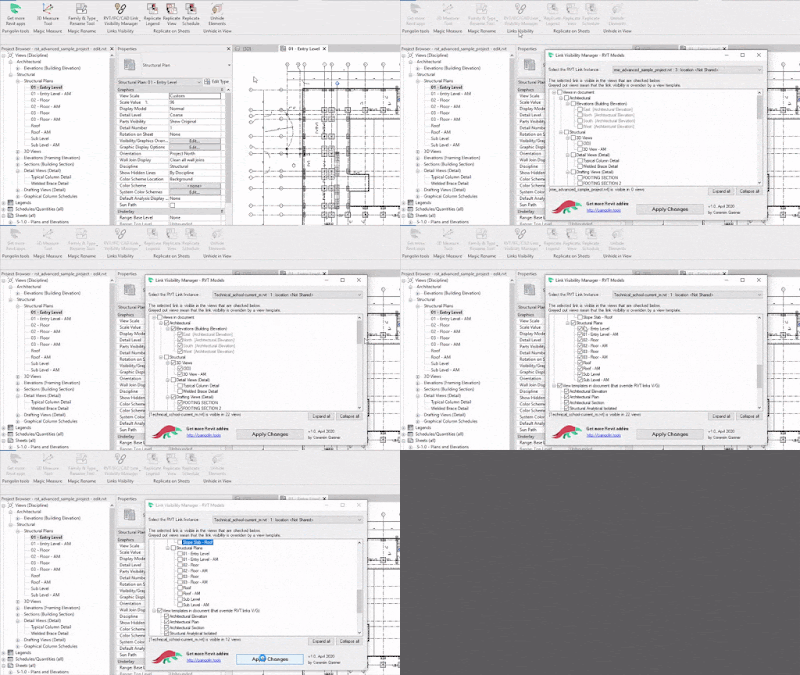
Use this add-in to quickly hide or unhide a link in a bunch of views. 

It works with :

  • RVT linked models
  • IFC linked models
  • CAD imports

For a selected link, you will have access to a list of all views (and view templates) in the project, indicating if the link is visible or not. You will be able to check/uncheck the items in the view list to show/hide the link in the views.

This is especially helpful when you load in the project a new link that becomes visible in every view in the document. Batch hide the link in all non-relevant views in a second with this plug-in.

App workflow

Monday, September 20, 2021

Free Links Manager

From the Autodesk App Store:

Description

The plugin provides an alternative to the built-in Manage Links Tool.

The program has a user-friendly design and allows you to quickly load Autodesk® Revit® Links or reload them from other files.